Codex mobile terminal uses third-party transfer stations

Core Principles
Utilize the decoupling design of the Codex client Auth layer (responsible for account verification and rights) and Model layer (responsible for actual conversation requests).
-
Auth layer: Continue to log in with your ChatGPT account to obtain its account identity and all functional benefits.
-
Model layer: Through configuration, direct its requests to a third-party transit service that supports the OpenAI
responsesAPI.
Preparation
- Account: A valid ChatGPT account (the free version is sufficient).
- Transfer service: a [transfer station account] (https://muskapi.cc) that supports OpenAI
responsesAPI mode - Configuration files: Find two local configuration files in Codex and prepare to modify them:
* ~/.codex/auth.json
* ~/.codex/config.toml
Detailed configuration steps
Step 1: Log in normally
First, in the Codex client, log in to your ChatGPT account as usual, and make sure the login is successful and the status is normal.
Step 2: Modify authentication configuration (auth.json)
Find and edit file ~/.codex/auth.json.
Key modifications:
-
Change the value of
"auth_mode"to"chatgpt". -
Set the value of
"OPENAI_API_KEY"tonull.
Purpose: Ensure that clients use the ChatGPT method for authentication and do not use the official OpenAI API Key, thus paving the way for switching model request layers.
Step 3: Modify model provider configuration (config.toml)
Find and edit the file ~/.codex/config.toml, and append the following configuration paragraph at the end of the file:
[[providers]]


id = "MuskAI" # Provider ID; customize as needed


name = "MuskAI" # Provider display name; customize as needed


base_url = "Copy the Base URL from User Center > API Keys"


models = [] # Keep this empty; the model list is fetched dynamically


experimental_bearer_token = "sk-xxxxxxxxxxxx" # Replace with your API Key


wire_api = "responses" # Must be set to "responses"


requires_openai_auth = true # Must be true to pass the client's authentication checks
Explanation of configuration items:
base_url: After logging in to the official website, copy the Base URL on the User Center - [API Key] page.experimental_bearer_token: Your API Key for this transit service.wire_api: This is the most critical item and must be set to"responses". This instructs Codex to send requests using OpenAI's/v1/responsesendpoint format instead of the common/v1/chat/completions. Most transit services require special configuration to support this endpoint.requires_openai_auth: Must be set totrue. This will make the client think that OpenAI's authentication is still being used, thus successfully passing the internal check and maintaining the login status and functionality of the ChatGPT account.
Step 4: Verify configuration
- Restart the Codex client to make the configuration take effect.
- Send a test message in the client.
- Log in to the MuskAI service console and view "Usage" or "Request Log". If you can see the API call record generated by the test conversation just now, the configuration is successful and the request has been forwarded to the third-party service.
Important Notes
- History Lost: After switching model providers, all previous conversation history will disappear. Because the conversation record is bound to a specific model provider, the previous record cannot be read after the change.
- Model name format: When configuring available models in a transfer station (such as MuskAi), the model name needs to include the provider prefix. For example, if you want to use GPT-5.4, the model name should be configured as
openai/gpt-5.4, not justgpt-5.4. - API endpoint requirements: The key to the success of this method is that the third-party transit service you choose must support OpenAI's
/v1/responsesendpoint. If the relay only supports the common/v1/chat/completionsendpoint, the codex request will fail. - Multi-terminal synchronization: After this configuration is modified, the functions and status of the desktop and mobile terminals of Codex will remain synchronized.
Final effect
With the above configuration, you achieve:
- Identity and Functionality: The client interface, account benefits (such as Plus logo, plug-ins, mobile version unlocking) are still provided by your original ChatGPT account.
- Computing power and model: The computing resources and models actually processed for all dialogue requests you initiate come from the third-party transfer API service you configured.
This allows you to flexibly choose more economical, faster or customized model services while enjoying the ChatGPT official client experience.
Replenish
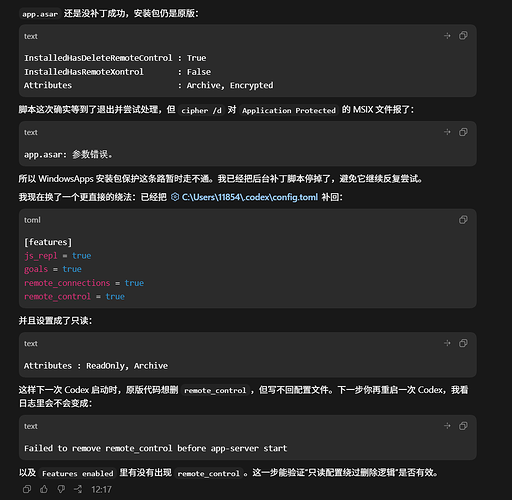
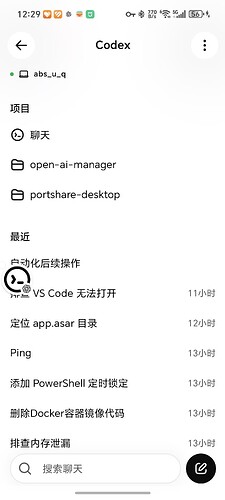
I saw many people writing to modify the configuration file, but they cannot connect to the codex on the windows side because the codex on the windows side deletes the configuration fields by default. Changing the configuration file to read-only will prevent codex from modifying the configuration file. In this way, you can access codex with your mobile phone. Post pictures: Change to read-only configuration:
Complete picture of connection:
Script file, change to ps1 suffix
$ErrorActionPreference = "Stop"


$workspace = "C:\Users\11854\Documents\Codex\2026-05-16\chatgpt-codex"
$package = Get-AppxPackage OpenAI.Codex
if (-not $package) {
  throw "OpenAI.Codex package not found."
}


$asar = Join-Path $package.InstallLocation "app\resources\app.asar"
$patched = Join-Path $workspace ("app.asar.patched-" + $package.Version)
$backup = Join-Path $workspace ("app.asar.backup-" + $package.Version + "-" + (Get-Date -Format "yyyyMMdd-HHmmss"))
$log = Join-Path $workspace "patch-current-codex-asar.log"
$config = "C:\Users\11854\.codex\config.toml"


function Log($message) {
  "$(Get-Date -Format o) $message" | Add-Content -LiteralPath $log -Encoding UTF8
}


function IndexOfBytes([byte[]]$haystack, [byte[]]$needle, [int]$start) {
  for ($i = $start; $i -le $haystack.Length - $needle.Length; $i++) {
    $ok = $true
    for ($j = 0; $j -lt $needle.Length; $j++) {
      if ($haystack[$i + $j] -ne $needle[$j]) {
        $ok = $false
        break
      }
    }
    if ($ok) { return $i }
  }
  return -1
}


function New-PatchedAsar {
  $bytes = [System.IO.File]::ReadAllBytes($asar)
  $encoding = [System.Text.Encoding]::UTF8
  $text = $encoding.GetString($bytes)
  $pattern = "function xV(e){return Object.hasOwn(e,``remote_control``)||SV(e.features)&&Object.hasOwn(e.features,``remote_control``)}"
  $patchedPattern = "function xV(e){return Object.hasOwn(e,``remote_xontrol``)||SV(e.features)&&Object.hasOwn(e.features,``remote_xontrol``)}"
  $needle = "remote_control"
  $replacement = [System.Text.Encoding]::UTF8.GetBytes("remote_xontrol")


  $idx = $text.IndexOf($pattern, [System.StringComparison]::Ordinal)
  if ($idx -lt 0) {
    if ($text.IndexOf($patchedPattern, [System.StringComparison]::Ordinal) -ge 0) {
      Log "Installed app.asar already appears patched."
      return $false
    }
    throw "Target xV function pattern not found."
  }


  $positions = @()
  $pos = $idx
  $end = $idx + $pattern.Length
  while (($pos = $text.IndexOf($needle, $pos, [System.StringComparison]::Ordinal)) -ge 0 -and $pos -lt $end) {
    $positions += $encoding.GetByteCount($text.Substring(0, $pos))
    $pos += $needle.Length
  }
  if ($positions.Count -ne 2) {
    throw "Expected 2 remote_control occurrences in target xV function, found $($positions.Count)."
  }


  foreach ($p in $positions) {
    [Array]::Copy($replacement, 0, $bytes, $p, $replacement.Length)
  }


  [System.IO.File]::WriteAllBytes($patched, $bytes)
  Log "Created patched asar: $patched offsets=$($positions -join ',')"
  return $true
}


function Ensure-ConfigFlag {
  $bytes = [System.IO.File]::ReadAllBytes($config)
  $text = [System.Text.Encoding]::UTF8.GetString($bytes)
  if ($text.Length -gt 0 -and [int][char]$text[0] -eq 0xFEFF) {
    $text = $text.Substring(1)
  }
  $changed = $false
  if ($text -match '(?m)^\s*remote_control\s*=') {
    if (($bytes.Length -ge 3 -and $bytes[0] -eq 0xEF -and $bytes[1] -eq 0xBB -and $bytes[2] -eq 0xBF)) {
      $encoding = [System.Text.UTF8Encoding]::new($false)
      [System.IO.File]::WriteAllText($config, $text, $encoding)
      Log "Removed UTF-8 BOM from config.toml."
    }
    return
  }
  if ($text -match '(?m)^\s*remote_connections\s*=\s*true\s*$') {
    $text = $text -replace '(?m)^(\s*remote_connections\s*=\s*true\s*)$', "`$1`r`nremote_control = true"
    $changed = $true
  } elseif ($text -match '(?m)^\s*\[features\]\s*$') {
    $text = $text -replace '(?m)^(\s*\[features\]\s*)$', "`$1`r`nremote_control = true"
    $changed = $true
  } else {
    $text += "`r`n[features]`r`nremote_control = true`r`n"
    $changed = $true
  }
  if ($changed) {
    $encoding = [System.Text.UTF8Encoding]::new($false)
    [System.IO.File]::WriteAllText($config, $text, $encoding)
    Log "Added remote_control to config.toml."
  }
}


function Get-CodexPackageProcesses {
  Get-CimInstance Win32_Process |
    Where-Object {
      $_.ExecutablePath -and
      $_.ExecutablePath.StartsWith($package.InstallLocation, [System.StringComparison]::OrdinalIgnoreCase) -and
      ($_.Name -eq "Codex.exe" -or $_.Name -eq "codex.exe")
    }
}


Log "Package version: $($package.Version)"
Log "Target asar: $asar"
New-PatchedAsar | Out-Null
Ensure-ConfigFlag


Log "Waiting for Codex package processes to exit."
while ($true) {
  $running = @(Get-CodexPackageProcesses)
  if ($running.Count -eq 0) {
    break
  }
  Log "Still waiting for Codex processes: $($running.ProcessId -join ',')"
  Start-Sleep -Seconds 2
}


try {
  & takeown /F $asar | Out-Null
  $currentUser = [System.Security.Principal.WindowsIdentity]::GetCurrent().Name
  & icacls $asar /grant "$($currentUser):(F)" | Out-Null
  Log "Granted temporary app.asar permission."
  $cipherOutput = & cipher /d $asar 2>&1
  Log "Requested app.asar decryption/unprotect exit=$LASTEXITCODE output=$($cipherOutput -join ' | ')"
} catch {
  Log "Failed to grant temporary app.asar permission: $($_.Exception.Message)"
  throw
}


if (-not (Test-Path -LiteralPath $backup)) {
  [System.IO.File]::WriteAllBytes($backup, [System.IO.File]::ReadAllBytes($asar))
  Log "Created backup: $backup"
}


try {
  $stream = [System.IO.File]::Open($asar, [System.IO.FileMode]::Open, [System.IO.FileAccess]::ReadWrite, [System.IO.FileShare]::None)
  $stream.Close()
} catch {
  Log "app.asar is still not writable: $($_.Exception.Message)"
  throw
}


Copy-Item -LiteralPath $patched -Destination $asar -Force
Log "Installed patched app.asar."


try {
  $currentUser = [System.Security.Principal.WindowsIdentity]::GetCurrent().Name
  & icacls $asar /remove:g $currentUser | Out-Null
  & icacls $asar /setowner "NT SERVICE\TrustedInstaller" | Out-Null
  Log "Restored app.asar owner/temporary grant."
} catch {
  Log "Failed to restore app.asar owner/temporary grant: $($_.Exception.Message)"
}


Ensure-ConfigFlag
Log "Done."
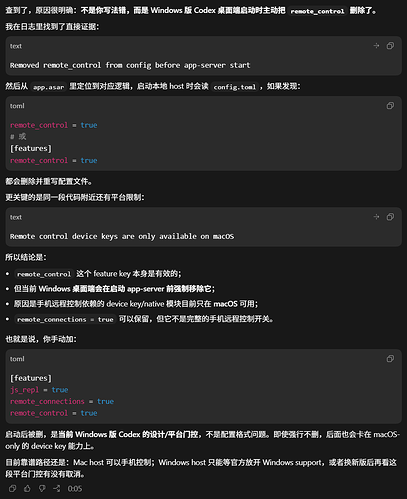
The official has not yet promoted the app_control link for windows I wrote a script. The principle is to start codex.exe through UAC-weighted cmd -> add statements to the configuration file and set it to read-only (before this, you must manually add it to the configuration file [features] js_repl = true goals = true remote_connections = true remote_control = true ) ->Restore readability after 90 seconds, and the program can write parameters